
New
🎉 New version released, experience the powerful TRELLIS 3D AI

TRELLIS 3D AI: Professional Image to 3D Asset Generation

Experience the power of TRELLIS 3D AI, where cutting-edge artificial intelligence meets professional 3D asset creation. TRELLIS 3D AI makes Image to 3D Asset conversion effortless - simply upload your image and watch as TRELLIS 3D AI generates stunning 3D assets with detailed geometry and vivid textures. Join thousands of creators using TRELLIS 3D AI for professional Image to 3D Asset generation.

Multi-view
Multi-format
Texture Mapping
Professional Restoration
Select Model
new

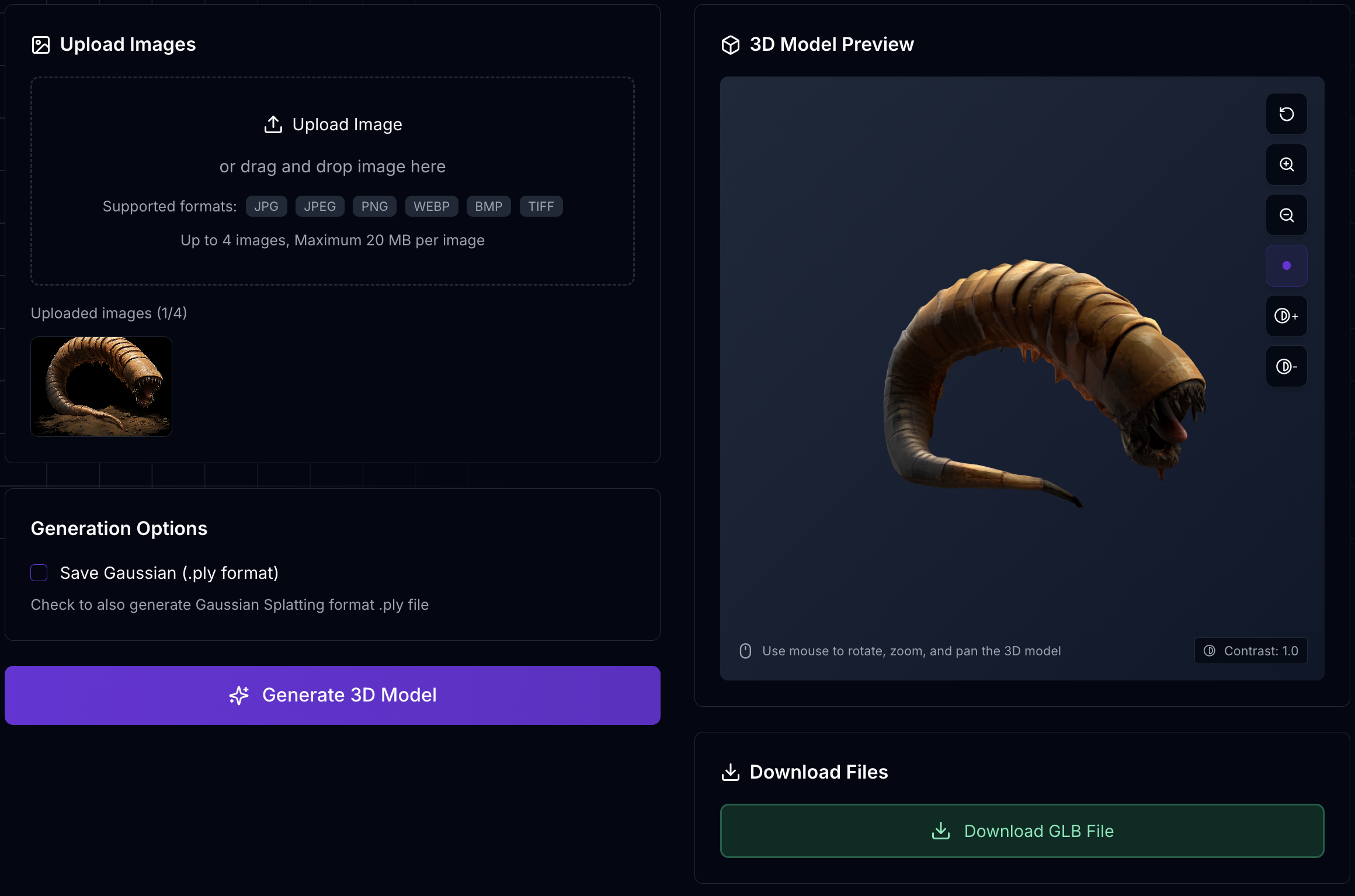
Upload Images

5,000–2,000,000 vertices. Fewer vertices produce smaller files.

Showcase

TRELLIS 3D AI Asset Gallery

Explore amazing Image to 3D Asset transformations created with TRELLIS 3D AI - the leading choice for professional 3D asset generation

Which 3D Model Fits Your Project?

TRELLIS 3D AI supports multiple 3D generation models. Choose by input, materials and controls. You can switch models in the generator above.

new

Trellis 2

Create from a single image with adjustable geometry resolution and PBR materials.

  • Single image
  • PBR materials
  • Resolution controls

Trellis 3D

Start with a low-credit option for everyday image-to-3D experiments.

  • Single / multi-view
  • Textures
  • Mesh density controls

Tripo 3D V2.5

Choose texture quality and polygon count to suit your next step.

  • Single / multi-view
  • Optional 4K textures
  • Polygon controls

HunYuan 3D

Explore object geometry with multiple reference views and adjustable mesh density.

  • Single / multi-view
  • Mesh density controls
  • Geometry-focused
Features

Features of TRELLIS 3D AI

Discover what makes TRELLIS 3D AI the leading choice for Image to 3D Asset generation - trusted by professionals worldwide

Advanced 3D Generation with TRELLIS 3D AI

TRELLIS 3D AI maintains crucial structural elements while generating detailed 3D assets from your images using its unique SLAT representation. Experience professional Image to 3D Asset conversion.

Multiple Output Formats

TRELLIS 3D AI generates 3D assets in GLB, OBJ, STL, GLTF, USDZ, and PLY formats, making it the perfect Image to 3D Asset solution for all your needs.

High-Quality Results

Experience sophisticated Image to 3D Asset generation with TRELLIS 3D AI, delivering detailed geometry and vivid textures in every conversion.

Browser-Based Preview

Preview your TRELLIS 3D AI generated assets directly in your browser. Our Image to 3D Asset viewer requires no software installation.

Local Editing Capability

TRELLIS 3D AI allows precise manipulation of your 3D assets. Transform any image to 3D asset with complete control over local regions.

Instant Processing

Get professional Image to 3D Asset results in seconds with TRELLIS 3D AI's optimized processing pipeline.

placeholder hero

How to Use TRELLIS 3D AI

Transform your images to professional 3D assets in 3 simple steps with TRELLIS 3D AI's intuitive process.

  • Upload Your Image

    Start by uploading your image. TRELLIS 3D AI will analyze it using advanced AI technology to prepare for professional 3D asset generation.
  • Generate and Preview

    Let TRELLIS 3D AI work its magic! Our advanced Image to 3D Asset technology transforms your image into high-quality 3D assets. Preview your creation instantly in our browser-based 3D viewer.
  • Download Your 3D Assets

    Download your generated 3D assets in GLB, OBJ, STL, GLTF, USDZ, and PLY formats. TRELLIS 3D AI provides professional-grade 3D assets ready for use in your projects, games, or applications.

BETTER INPUT. BETTER STARTING POINT.

How to Get Better 3D Results with TRELLIS 3D AI

The quality of an AI-generated 3D model depends on more than the model itself. Your input image also plays an important role. These practical checks help you prepare a more useful reference.

Input image exampleJade ceramic teapot reference image
A clear silhouette

Keep the subject complete and easy to distinguish.

Choose the Right Input Image

Give the model a clear view of the object you want to create.

  • One main object: choose one clearly identifiable subject.
  • Clean background: avoid surroundings that compete with the subject.
  • Complete subject: keep the object inside the frame without cropping its edges.
  • Good lighting: avoid heavy shadows, overexposure, and distracting reflections.
  • Clear details: use a sharp image with a readable shape and surface.

Tips for Better 3D Reconstruction

Remove unnecessary background distractions when possible, avoid overlapping objects, and choose a view that shows the overall shape clearly. After generation, compare the model with the reference and inspect it from multiple angles rather than judging only the front view.

Check Hidden Surfaces and Multi-View Inputs

Image-to-3D models infer surfaces that your references do not show, so hidden areas may differ from the real object. When the selected model supports multiple images, use consistent views of the same object. Inspect the back, underside, and fine details of every result before using it.

MADE FOR YOUR NEXT PROJECT

What Can You Create with TRELLIS 3D AI?

Use image-to-3D generation to explore ideas and create starting assets for your next project. The amount of finishing work depends on how the asset will be used. Texture and PBR material support depend on the model you select.

3D Assets for Game Development

Generate props, objects, and visual references for game projects. AI-generated assets can accelerate exploration and prototyping, while production use may require retopology, polygon reduction, UV adjustments, and material optimization.

3D Product Models for E-commerce

Turn product references into 3D starting models for interactive previews and creative presentations. Check the reconstructed shape, colors, labels, and hidden surfaces before using a model to represent a real product.

3D Modeling for Designers

Accelerate early-stage design exploration by creating starting models from reference images, then refine them in your preferred 3D software. Use the result as a modeling aid rather than a dimensionally accurate scan.

3D Models for Prototyping and 3D Printing

Create a starting model from a visual reference for further modeling and prototyping. Before printing, check and prepare watertight geometry, wall thickness, scale, and mesh integrity.

Choose the plan that's right for you

Get all features of TRELLIS 3D AI, generate professional 3D assets from images in seconds with our advanced AI technology.

Basic

$8
$10
USD/month
Billed Annually
  • 300 credits/month
    • 100 Trellis 3D models
    • 10 Trellis 2 models
    • 10 Tripo 3D V2.5 models
    • 30 HunYuan 3D models
  • 3 concurrent tasks
  • Access to Trellis 2
  • Assets owned by customer
  • Faster generation speed
  • Multiple format outputs
  • Priority support

Plus

$16
$20
USD/month
Billed Annually
  • 1,000 credits/month
    • 333 Trellis 3D models
    • 33 Trellis 2 models
    • 33 Tripo 3D V2.5 models
    • 100 HunYuan 3D models
  • 10 concurrent tasks
  • Access to Trellis 2
  • Assets owned by customer
  • Faster generation speed
  • Multiple format outputs
  • Priority support

Pro

$48
$60
USD/month
Billed Annually
  • 4,000 credits/month
    • 1,333 Trellis 3D models
    • 133 Trellis 2 models
    • 133 Tripo 3D V2.5 models
    • 400 HunYuan 3D models
  • Unlimited concurrent tasks
  • Access to Trellis 2
  • Assets owned by customer
  • Faster generation speed
  • Multiple format outputs
  • Priority support

Enterprise

For organizations that need to use and customize solutions on a large scale

  • Custom credits/month
  • Unlimited concurrent tasks
  • Assets owned by customer
  • Faster generation speed
  • Multiple format outputs
  • Priority support
  • Assets permanently retained
FAQ

TRELLIS 3D AI Frequently Asked Questions

Learn more about TRELLIS 3D AI and how it can transform your Image to 3D Asset workflow.

1

What makes TRELLIS 3D AI different from other 3D generation tools?

TRELLIS 3D AI uniquely combines Structured LATents (SLAT) with powerful vision encoders for professional Image to 3D Asset generation. Unlike basic tools, TRELLIS 3D AI uses advanced technology to understand and preserve both geometric and visual details in every conversion.

2

Is TRELLIS 3D AI free to use?

Yes, TRELLIS 3D AI offers a free online version for Image to 3D Asset conversion. Our professional Image to 3D Asset generation features are available for users who need additional capabilities.

3

What types of images work best with TRELLIS 3D AI?

TRELLIS 3D AI works well with most image types for professional 3D asset generation. Our Image to 3D Asset technology excels with clear, well-lit images that show distinct object features.

4

What 3D formats does TRELLIS 3D AI support?

TRELLIS 3D AI generates professional 3D assets in GLB, OBJ, STL, GLTF, USDZ, and PLY formats. Our Image to 3D Asset conversion supports various applications and platforms.

5

Can I use TRELLIS 3D AI for commercial projects?

Yes, 3D assets created with TRELLIS 3D AI can be used commercially. Our Image to 3D Asset generation is perfect for professional and commercial applications, subject to our terms of service.

6

Which models can I use on TRELLIS 3D AI?

The homepage generator includes Trellis 2, Trellis 3D, Tripo 3D V2.5 and HunYuan 3D. Select a model using the model cards or the model menu in the generator.

7

Which models support multiple reference images?

Trellis 3D, Tripo 3D V2.5 and HunYuan 3D support single-image and multi-view inputs here. Use different views of the same object. Trellis 2 accepts one reference image.

8

Do all models include textures and PBR materials?

Trellis 3D supports textures. Trellis 2 supports textures and PBR materials. Tripo supports textured PBR output when a texture option is selected, including an optional 4K setting. The current HunYuan workflow focuses on geometry and does not provide textures or PBR materials.

About

About TRELLIS 3D AI

TRELLIS 3D AI represents the cutting edge of AI-powered Image to 3D Asset generation technology. This innovative tool combines advanced neural networks with Structured LATents (SLAT) to create high-quality 3D assets that maintain both structural integrity and visual details. TRELLIS 3D AI is trusted by professionals worldwide for reliable Image to 3D Asset conversion.

Unlike traditional 3D modeling tools, TRELLIS 3D AI offers an effortless Image to 3D Asset conversion process. With powerful pretrained vision encoders and rectified flow transformers, TRELLIS 3D AI generates detailed 3D assets that capture both geometric and visual characteristics of the input image. Experience why TRELLIS 3D AI is the preferred choice for professional Image to 3D Asset generation.

Create Your Perfect 3D Assets with TRELLIS 3D AI

Start generating professional 3D assets with our AI-powered Image to 3D Asset converter today.